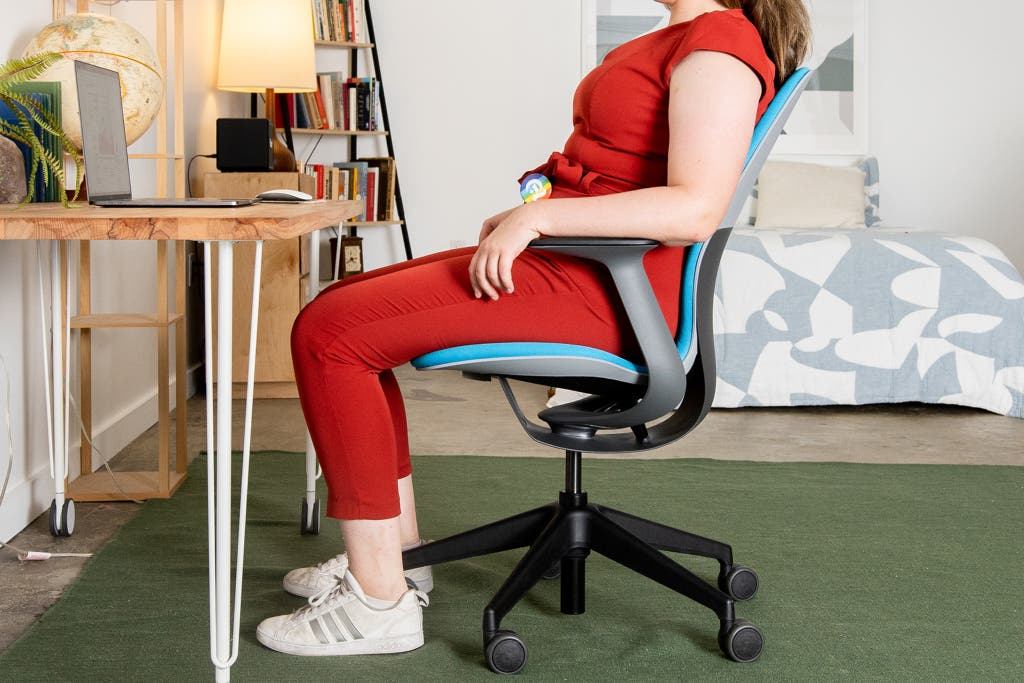
A well-fitted chair doesn’t shout about itself; it quietly removes friction. When your office chair matches your body, work feels less like endurance and more like flow. You think about the task, not your shoulders. You finish the day with energy left. Sizing is where that begins—translating your shape and habits into seat height, depth, back support and movement that actually fit you.
What “fit” really means
Fit means your joints sit in friendly angles and your weight is shared by the big muscle groups, not pinched into small pressure points. Feet rest flat and steady; thighs are supported without the seat biting into the back of the knees; the pelvis is neutral so the spine keeps its natural curves; elbows hover at desk height so shoulders can relax. When those touchpoints line up, everything else gets easier.
Seat height: start from the ground up
Measure from the floor to the underside of your knee while wearing the shoes you usually work in—this is your popliteal height and the best predictor of seat height. Set the chair so your hips are level with or a touch above your knees and your feet sit flat. For most people, that lands somewhere around 41–53 cm, but your own measurement is the truth. If your desk is high and forces your arms to shrug, raise the chair to suit your elbows and add a footrest to keep the legs supported. The goal is ease, not perfect geometry: you’re looking for steady feet, open hips and no pressure at the front edge of the seat.
Seat depth: support the thigh, spare the knee
Seat depth decides whether your thighs feel carried or crowded. Aim for a small gap—about two to three fingers, roughly 5–7 cm—between the seat’s front edge and the back of your knees. Too deep and circulation grumbles; too shallow and you lose thigh support and end up perching. If your chair has a seat slider, bring the seat forward until you feel fully supported, then back it off slightly to create the gap. If you’re choosing a chair size, note that shallower seats suit smaller frames; deeper seats suit taller bodies. You should never feel the seat edge pressing into your calves.
Seat width and cushioning: room to breathe
You want a few centimetres of clearance on either side of your hips so fabric or arm pads don’t trap you in a narrow channel. On a mesh seat, check that the frame isn’t sharp against the thigh; on a cushioned seat, look for foam that doesn’t bottom out after a few minutes. The right padding vanishes—it distributes pressure rather than calling attention to itself.
Backrest and lumbar: place the curve where your curve lives
Your lower back asks for gentle, consistent support. Adjust the lumbar pad so it sits at the small of your back (around the belt line for many people) and meets you rather than pushes you. If the backrest height moves, bring the main curve into contact with your lumbar curve; if only the lumbar pad moves, take a few minutes to find the height that keeps the pelvis from rolling back. With a mesh office chair, tensioned mesh can cradle the whole back; make sure the lumbar bar is adjustable and doesn’t dig in. You should feel lifted, not wedged.
Armrests: set the desk–chair handshake
The easiest way to settle your shoulders is to match armrest height to desk height. Sit upright, relax the shoulders, bend elbows to roughly 90–100°, and raise the armrests until your forearms can rest lightly without lifting you. If your armrests splay wide, bring them closer so your arms fall naturally under the shoulders rather than winging out. If they hit the desk or trap you close, lower or slide them back. And if your desk is fixed and tall, prioritise elbow comfort (raise the chair), then bring in a footrest to keep the legs happy.
Chair and desk as a system
A good fit lives at the meeting point of seat and surface. Standard desks sit around 72–75 cm high; shorter users often need either a lower desk or a footrest once the chair is raised to align elbows with the desktop. Taller users may prefer a chair with a longer gas lift so knees aren’t squashed. If you switch between writing and keyboard work, consider a keyboard tray or a split-level surface; your ideal typing height is often a touch lower than your ideal handwriting height.
Tilt, recline and movement: comfort that follows you
Static postures tire even strong backs. Unlock the backrest and use a natural recline—somewhere between 100–120° for most tasks—so the chair shares load with your body. If your chair offers synchro-tilt (the back moves more than the seat), set tension so it follows your weight without flinging you backward; you should be able to lean and return smoothly. Knee-tilt mechanisms keep the front edge of the seat more stable during recline and can help if you’re sensitive behind the knees. A little motion throughout the day—micro-leans, unlocked back, feet planted—does more for comfort than any single setting.
Mesh or upholstered: match material to your climate and habits
Breathability matters if you work long hours or live in a warm climate. A mesh office chair stays cooler and dries quickly, which can keep you fresher late in the day. Test for tautness so the mesh supports rather than hammocks; sit long enough to be sure the front frame isn’t the part you end up feeling. Upholstered seats offer a gentler first contact and can feel plusher at first; quality here lives in foam density and how the cushion shares weight over time. Either path can work—the right choice matches your body, your space and your routine.
Finding your comfiest office chair (spoiler: comfort is fit plus support)
When people talk about the comfiest office chair, they’re often describing a chair that matches their measurements and lets them move. Look for four core adjustments at minimum: seat height, seat depth, lumbar height and armrest height. Add backrest recline with a smooth, supportive tilt. If possible, sit in the chair as you work would demand—type, reach, glance to the side—then notice how you feel after 20 minutes. Check for red flags: numb toes, pressure at the seat edge, shrugging shoulders, a lower back that tires unless you slouch. Comfort should feel uneventful; you forget the chair while you focus on the work.
A quick home fitting routine
Bring a tape measure to the process. Note your popliteal height (floor to knee underside), your elbow height when seated at your desk, and the distance from the back of your knee to the back of your hip (a guide for seat depth). Set the chair to those numbers, then fine-tune by feel: a finger’s gap at the knee, elbows floating at desk height, lumbar making friendly contact, backrest unlocked. Give it a day, then adjust again—your body offers better feedback after real hours than in a showroom sprint.
The quiet upgrade
Sizing an Office chair isn’t about chasing features; it’s about aligning a tool to a body so the day feels lighter. Start with the fundamentals—height, depth, lumbar, arms—and let the rest fall into place. Whether you land on a mesh office chair for its cool, supportive feel or an upholstered model for its gentle cushioning, the best result will be the one that disappears beneath your attention. When the fit is right, work flows, shoulders drop, and the chair becomes what it was meant to be: a quiet ally in how you spend your hours.
